How to Protect Your Organization from Malicious Macros
Introduction
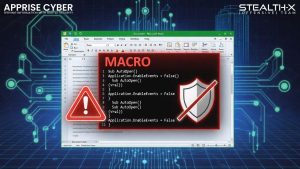
In the modern digital workplace, organizations rely heavily on document-based communication and automation tools. Applications like Microsoft Office improve productivity by allowing users to create automated workflows using macros. However, cybercriminals are increasingly using malicious macros to launch sophisticated cyber attacks.
Protecting your organization from malicious macros is a critical part of a strong cybersecurity defense strategy. Businesses must understand how these threats work and implement preventive security controls.
This article explains how malicious macros work and provides practical steps to secure your organization.
What Are Macros?
Macros are small automated programs that help users perform repetitive tasks quickly. They are commonly used in:
- Microsoft Word
- Microsoft Excel
- Microsoft PowerPoint
Macros are typically written using VBA (Visual Basic for Applications). Organizations use macros for:
- Data processing automation
- Report generation
- Task simplification
- Business workflow optimization
Although macros improve efficiency, they also create security risks if not properly managed.
What Are Malicious Macros?
Malicious macros are harmful scripts hidden inside document files. Attackers design these macros to execute unauthorized commands when a document is opened or enabled.
Cybercriminals often distribute infected documents through:
- Phishing emails
- Fake job offers
- Fake invoices
- Social engineering attacks
- Malicious attachments
Once the user enables macros, the malicious code can:
- Download malware
- Steal sensitive information
- Compromise system security
- Provide remote access to attackers
How Do Malicious Macro Attacks Work?
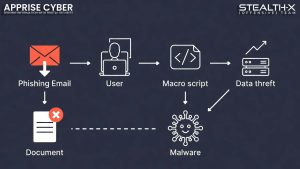
Understanding attack methods helps organizations defend themselves better.
- Phishing Email Delivery
Attackers send documents that look legitimate. Users are tricked into opening attachments and enabling macros.
- Social Engineering Techniques
Messages inside documents may instruct users to enable macros to view content.
- Hidden Script Execution
After activation, malicious macros run background commands without user knowledge.
- Malware Installation
Macros may download and install additional malware on the system.
Impact of Malicious Macros on Organizations
Organizations can suffer serious damage due to macro-based attacks.
Data Theft
Sensitive business information may be stolen.
Financial Loss
Cyberattacks can lead to transaction fraud and recovery costs.
Reputation Damage
Customer trust can be affected.
Operational Disruption
Systems may stop functioning properly.
How to Protect Your Organization from Malicious Macros

- Disable Macros by Default
The best security practice is to disable macros unless absolutely required.
Configure office applications to:
- Block automatic macro execution
- Allow macros only from trusted sources
- Implement Email Security Filtering
Use advanced email security systems to:
- Detect phishing emails
- Scan attachments before delivery
- Block suspicious files
- Use Endpoint Security Solutions
Install professional cybersecurity protection tools that provide:
- Malware detection
- Behavioral monitoring
- Real-time threat blocking
- Train Employees About Cyber Awareness
Human error is a major cause of cyber attacks.
Conduct regular training sessions covering:
- Phishing detection
- Safe attachment handling
- Avoiding unknown downloads
- Enable Document Security Policies
Organizations should enforce strict policies such as:
- Blocking macros from external documents
- Allowing only digitally signed macros
- Restricting document execution permissions
- Update Software Regularly
Keep operating systems and office software updated.
Security patches help fix vulnerabilities exploited by attackers.
- Use Sandboxing Technology
Sandboxing allows organizations to:
- Open suspicious files in isolated environments
- Analyze behavior safely
- Prevent system infection
- Monitor Network Activity
Security teams should continuously monitor:
- Unusual outbound connections
- Unknown script execution
- Suspicious login attempts
- Backup Important Data
Regular backups ensure business continuity.
If an attack occurs:
- Restore data from secure backup storage
- Avoid paying ransom demands
- Deploy Advanced Cybersecurity Solutions
Professional cybersecurity services help organizations build strong defense layers.
Best Practices for Employees
- Do not open unknown attachments
- Avoid enabling macros from untrusted documents
- Report suspicious emails immediately
- Follow organizational security guidelines
Role of Cybersecurity Companies
Organizations should partner with professional cybersecurity experts to conduct:
- Security audits
- Vulnerability assessments
- Threat monitoring
- Incident response planning
Why Malicious Macro Protection Is Important
Preventing macro attacks helps organizations:
- Protect confidential data
- Maintain business operations
- Avoid financial fraud
- Strengthen digital trust
Conclusion
Malicious macros remain a serious cyber threat for organizations worldwide. Attackers are continuously developing new techniques to bypass security systems. Organizations must adopt a proactive cybersecurity approach by combining technology, employee awareness, and security policies.
Disabling unnecessary macros, securing email systems, training employees, and using advanced security solutions can significantly reduce risk.
Strong cybersecurity protection is not optional—it is essential for modern business survival.
Protect Your Organization with Professional Cybersecurity Services
If you want to secure your business from advanced cyber threats, partner with experts.
👉 Contact Apprise Cyber today for professional cybersecurity solutions, security audits, and threat protection strategies.
Stay secure. Stay protected.